Grim Reaper Beastie Sketch New - CrawCrafts Beasties

Flashback Friday – Beastie Sketches

Hello everyone! I’ve something a little different for you this Flashback Friday – a retrospective of Beastie sketches, or “Sketch-rospective”, if you will!

It occurred to me recently that the sketches I draw for custom Beasties very rarely see the light of day. I do them, I send them to the customer, we finesse the details. Then I put the originals in a folder, stash the electronic versions in with the photos of the finished Beastie… And that’s it! So, how about we take a peek in those archives?

I had to look waaay back through my old sketchbooks to find my very first Beastie commission drawing. Check it out!Diver Beastie Sketches - CrawCrafts BeastiesPretty rustic, eh? Back then I was using “graduate” sketchbooks – books with a thick paper cover that are stapled together in the middle like a magazine – and sending my customers photos of the pages. That’s why you can see shadows down some of the sides!

I was also outlining with my favourite fountain pen, and colouring in by hand with coloured pencils. It took FOREVER! Especially for large areas of black, like this Grim Reaper Beastie from the following year.
Grim Reaper Beastie Sketch New - CrawCrafts BeastiesThat said, I did keep on drawing by hand for a good while afterwards! Here are a couple from back in 2017 – do any of you recognise these Beasties?
Cyclist Beastie Sketches - CrawCrafts Beasties
Cyclist BeastieSimon's Explorer Beastie - CrawCrafts Beasties
Slartibartfast, who now hangs out with Simon of Simon’s SpaceDublin Football Beastie Sketches - CrawCrafts BeastiesDublin Football Beastie
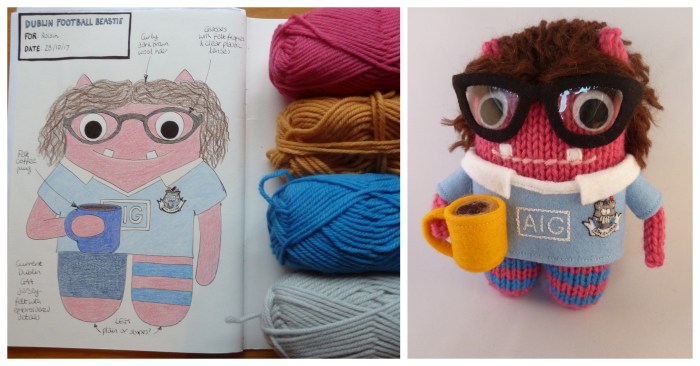
However, much as I love the hands-on approach, I was having trouble keeping up! A hectic pre-Christmas season in 2017 had me scouting around for new drawing options… Preferably ones that wouldn’t involve quite as much controlled shading with coloured pencils.

Enter GIMP and Inkscape, two open-source computer graphics programs. I won’t pretend that the learning curve with these has been speedy – I still feel like I’m figuring out the angles a bit – but the one-click colouring is a definite plus. This is my first attempt:
First Digital Sketches! CrawCrafts BeastiesThen when I figured out that I could scan in my fabric stash and show people the actual prints I’d be using for their Beastie’s outfits, I couldn’t have been happier!
Family Frame Beasties - Sketches - CrawCrafts BeastiesAnd although I can now type most of the text, I still like to throw the odd bit of my own hand-drawn lettering into the sketches too.
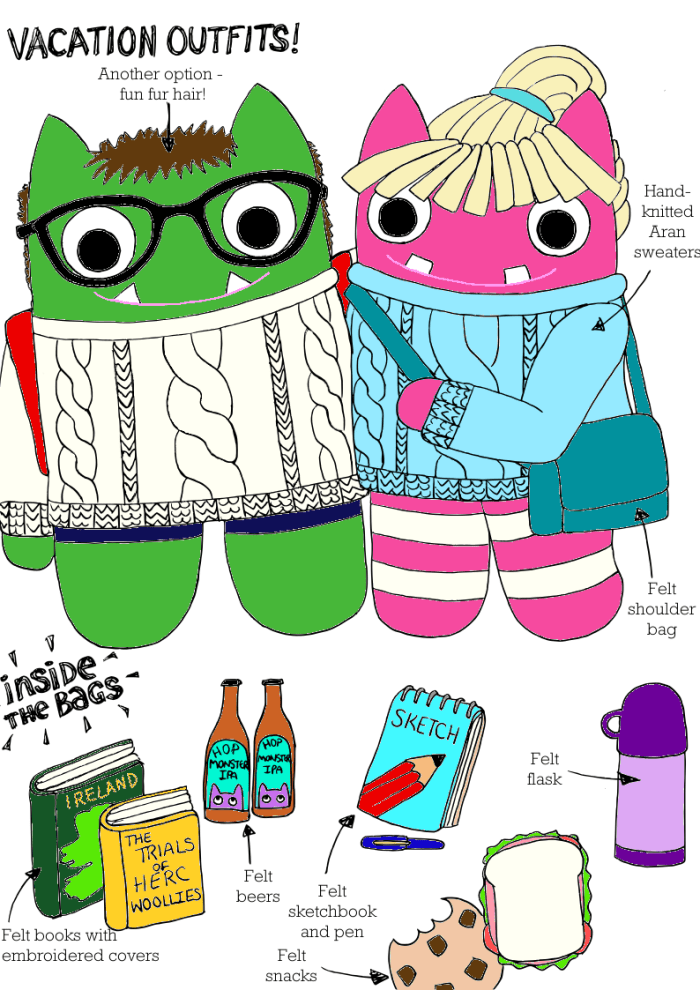
David and Tammie Beasties - CrawCrafts BeastiesHow about you? Will you be cracking out your pencils this weekend, or creating artwork on your computer? Be sure to tell us all about it in the comments!

We’ll be back next week to see what Paddy and Plunkett have been up to – see you then!

Springtime Beastie Fun! CrawCrafts Beasties

Friday Social #4 – Getting Arty, For Free!

Artist Beastie
Welcome to the weekend, Beastiebuddies!

And since it’s the end of the week, my mind has wandered in an artsy direction for this Friday Social. In school, it seemed like art class always fell on a Friday afternoon, and it was a much nicer way to wrap up the week than, say, double maths or – gulp – SPORTS. That said, school art and I had a somewhat troubled relationship. While there were a few standout moments – making a kiwi-fruit inspired dress, or modelling cartoon frogs in clay – I seemed to spend A LOT of time drawing not-very-interesting things. In one particularly awful session, we were asked to copy the Arnolfini Wedding Portrait. For those of you unfamiliar with this highly detailed painting, with its lush textures and crazy use of perspective and reflections…

Arnolfini Portrait by Jan van Eyck
Arnolfini Portrait by Jan van Eyck (Image from Wikipedia)

We were given an hour and a half to complete this task. “And if you have some time left over,” our teacher added, “You can write a short piece about the artist’s life and work.”

No wonder I left school with the firm conviction that I couldn’t really draw! Since then, I dabbled in doodling comics now and again, but it wasn’t until I started creating tailor-made personalised Beasties that I actually had a reason to up my drawing game. I figured a quick sketch was the best way to show people what to expect from their finished monster, and with each sketch, I started to feel a bit more confident about my drawing.

That said, these “quick sketches” weren’t really quick! As each one was hand-drawn and coloured with what I had to hand (colouring pencils), they were taking forever!
Beastie Sketchbook - A Design for Laura - CrawCrafts Beasties
So, as some of you may remember, last year I asked my lovely friend Julie from Juleco to show me the basics of Adobe Illustrator, in the hope that I might be able to get the computer to take on some of the more time-consuming tasks (I’m looking at you, colouring in). Our session was really helpful, and I could see the software being super-useful, but WOOOAAAAH is it expensive! I really couldn’t justify the outlay, and after availing of more week-long free trials than was right or proper, I let it slide.

But then, enter Simon from Planet Simon, with this handy post about how he was creating illustrations using free, open-source drawing software! I had actually looked at these programs briefly myself, but then I’d scuttled back to Illustrator because I found them utterly baffling. Once I knew which tools to use to make them work for the projects I wanted to complete, I was away!

And so, last month, I was finally able to present my first ever computerised commission sketch!
First Digital Sketches! CrawCrafts Beasties
I’m still hand-drawing the outlines, but the real time-saver (even though I’m working out the angles as I go) comes when I’m ready to colour in. Now I can fill a large area with one click, and I can match colours much more closely to the materials I’ll be using. Also, check out the skirt on that Beastie in the lab coat… rather than trying to replicate patterned fabrics by hand, I can photograph the swatch and just drop it into the picture! So much quicker – and my customer knew exactly what I was offering her, too.

So, which programs am I using? Well, I scan in my hand-drawn outlines first, then open those files in Inkscape, where I use the “Bitmap trace” to smooth out the less desirable bits of the scanned images – paper textures, ink smudges etc. I save that, then switch to GIMP (GNU Image Manipulation Program) to do the majority of the work… correct wonky outlines, erase any pencil marks that survived the tracing, and most importantly, pop in those colours!

And, as I get used to the process, I’m not just using it for sketches any more! I created this image for my March calendar page, and thanks to the wonders of digital drawing, I’ve been able to rejig it into an Easter colouring page as well!
Beaster Image - Free Colouring Page by CrawCrafts Beasties
You can download the full-size version for yourself from my store… Just in case you have any little monsters of your own to entertain over the Bank Holiday weekend! It’s free, and you can print off as many copies as you need to!

Oh, and while you’re there…
April Calendar Image - Free printable download from CrawCrafts Beasties
April’s calendar page is also ready to go! I’m hoping this nice sunny image will help to kick-start some warmer, brighter weather for us all!

How about you? Do you use any nifty programs in your artwork that we need to know about? Be sure to tell us all about them in the comments below!

Have yourselves a super (B)Easter weekend, and join us again on Tuesday for more monster fun and games! See you then!